
Setting Up Your Dedicated Phone Number in BoatWizard
We’re excited to introduce Dedicated Phone Numbers for your Boat Detail Pages—making it easier than ever for buyers to reach you directly. With this new feature, calls from interested buyers will ring straight to your mobile phone, not the office, helping you respond faster and streamline the buying experience.
How to Unlock Your Dedicated Phone Number
When you log in to BoatWizard, you’ll see a pop-up asking you to verify your mobile number. Verification is required so we can securely assign your dedicated number.
Here’s how it works:
- Enter your Mobile Phone Number and Role when prompted.
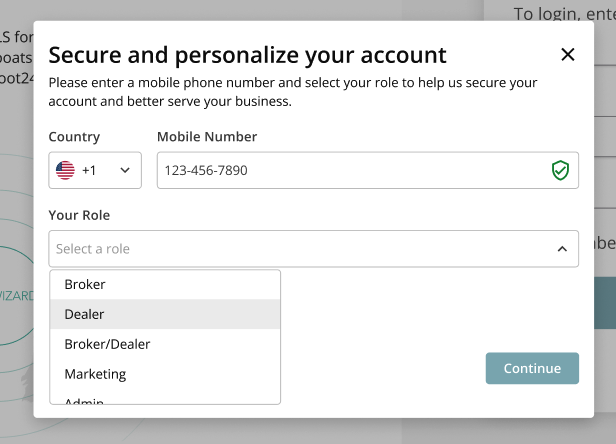
- You’ll receive a 6-digit One-Time Passcode (OTP) on your mobile device.
- Enter the OTP to complete verification.
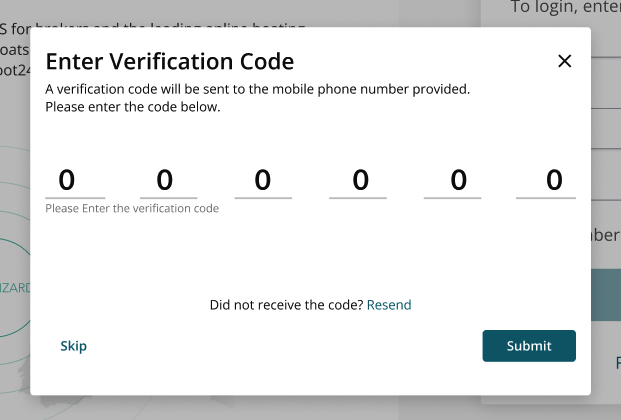
- Once verified, your dedicated phone number will be automatically assigned and connected to your listings.
Prefer not to verify right away?
You can choose to "Skip"— you’ll be prompted again the next time you log in. Your listings will continue to use your fallback office number until your mobile number is verified.
Why Mobile Verification Matters
Verifying your mobile number allows us to:
- Secure your account
- Assign your dedicated phone number
- Route buyer calls directly to you
- Ensure the correct phone number appears across your listings
If your mobile phone number is not verified, we will use fallback logic and show an office phone number instead.
What If You Change Your Mobile Phone Number?
If you update your mobile number on your User Account Page:
- You will be assigned a new dedicated phone number.
- All your listings will automatically update with the new number.
If your account becomes deactivated, the dedicated number will be removed, and fallback office numbers will be displayed instead.
Which Phone Number Appears Where?
- If a Sales Rep is assigned to the listing and has a verified mobile number, we show their dedicated phone number.
- If the Sales Rep does not have a verified mobile number, we show the office-level dedicated number (if available).
- If the office does not have one, we show the regular office phone number.
Note: Existing dedicated office numbers already assigned to portals will remain in place.
In BoatWizard ProSeller Platform & Printed Brochures:
- These will continue to display the Sales Rep’s original mobile number, not the dedicated number.
Need Help?
If you have any questions or need assistance completing your setup, please reach out to your Account Manager.